Knowledge Based Software Decoded: Pick, Build, And Keep It Alive
What Knowledge Based Software Actually Does
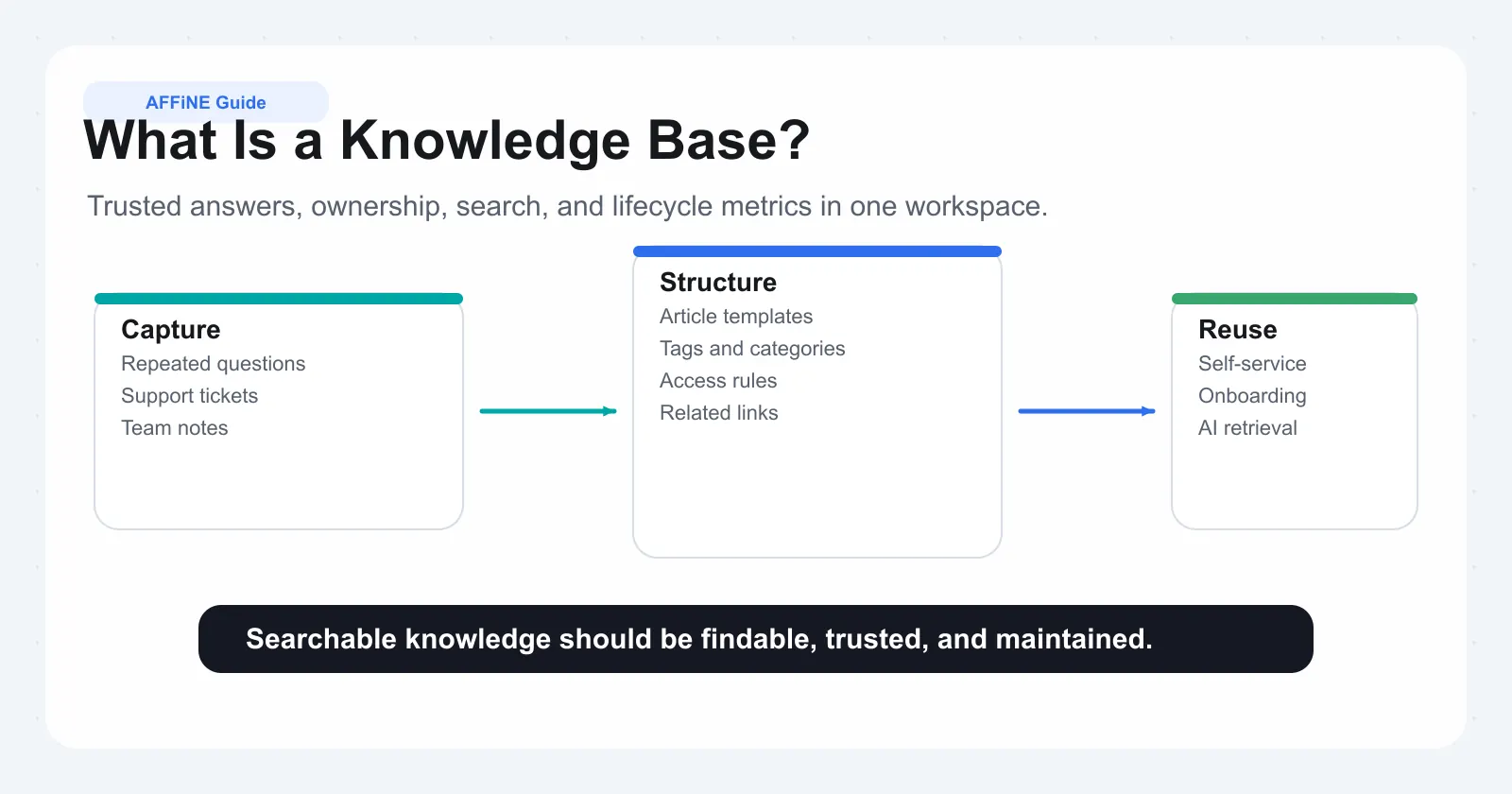
What is a knowledge base? At its simplest, it is a centralized, searchable repository where verified information lives so people can find answers without tapping a colleague on the shoulder or waiting on hold. Knowledge based software takes that concept and wraps it in tools for creating, organizing, and surfacing institutional knowledge at the moment someone needs it. Think of it less as a filing cabinet and more as a living system that actively connects questions to answers.
Knowledge based software is a platform that captures, structures, and delivers organizational knowledge so teams and customers can self-serve accurate answers without relying on individual experts.
Defining Knowledge Based Software in Plain Terms
Imagine a new support agent handling their first ticket. Instead of pinging three senior reps across time zones, they type a question into the knowledge base software and get a step-by-step troubleshooting guide written by the team last quarter. That is the core value proposition: reducing the distance between a question and a trusted answer.
A knowledge base platform does this through a combination of content editors, taxonomy systems, permission layers, and search algorithms. Authors create articles, tag them by topic, and publish them to specific audiences. Readers search or browse, find what they need, and get back to work. The software tracks what gets viewed, what gets searched but not found, and what goes stale, giving content owners the signals they need to keep things current.
Whether you see it written as knowledgebase software or as two separate words, the function is the same: turn scattered expertise into structured, findable content.
Why This Category Exists and Who It Serves
Three forces pushed knowledge base software from a nice-to-have into a necessity. First, distributed teams. When your workforce spans continents and time zones, you cannot rely on hallway conversations or quick desk visits for knowledge transfer. If it is not documented and searchable, it effectively does not exist for remote colleagues.
Second, information overload. Teams now juggle Slack threads, Google Docs, shared drives, email chains, and project boards. Critical answers get buried under the sheer volume of daily communication. Knowledge base tools solve this by giving information a permanent, discoverable home outside the noise of real-time messaging.
Third, the cost of repeated questions. Intercom's Customer Service Trends Report 2024 found that empowering customers to self-serve answers is a top priority for 40% of C-level support executives. Internally, the math is similar: every repeated question pulls an expert away from higher-value work. Knowledge based software breaks that cycle by making the answer available before the question gets asked twice.
The audience spans customer support teams deflecting tickets, HR departments onboarding new hires, IT desks managing runbooks, and product teams preserving decision context. Any group that repeatedly answers the same questions or risks losing expertise when people leave is a candidate.
Knowledge Base vs Document Storage vs Wiki
These three categories overlap just enough to cause confusion, so here is the distinction. A document storage system like Google Drive or SharePoint holds files. It is a container, not a discovery engine. You need to know what you are looking for and roughly where it lives.
A wiki, as HubSpot's comparison explains, is a collaborative space where anyone on the team can share or update information freely. Wikis excel at speed and openness but sacrifice structure and reliability. Without editorial oversight, content drifts, duplicates pile up, and trust erodes.
A knowledge base sits between the two. Content is curated, verified, and organized by taxonomy rather than folder hierarchy. Access controls determine who can view, edit, or publish. Analytics reveal what is working and what is missing. The result is a single source of truth, not just a pile of documents or a free-for-all wiki. Whether you call it a knowledgebase or knowledge base, the defining trait is intentional structure paired with powerful search, designed so the right answer reaches the right person at the right time.
Understanding what this software category is and why it matters sets the stage, but not every team needs the same type of knowledge base. The differences between an internal employee system, a customer-facing help center, and an IT service desk shape everything from feature priorities to access design.
Types of Knowledge Management Systems and How They Differ
Not all knowledge bases solve the same problem. A support team building a customer-facing help center has radically different priorities than an IT service desk documenting runbooks or an HR department housing onboarding guides. Choosing the wrong type leads to poor adoption, wasted budget, and the same scattered-information problem you started with.
The different types of knowledge management systems break down into four primary categories: internal, external (customer-facing), IT service desk, and personal. Each serves a distinct audience, emphasizes different capabilities, and measures success with different metrics. Here is how they compare at a glance.
| Type | Primary Audience | Key Requirements | Example Use Case |
|---|---|---|---|
| Internal Knowledge Base | Employees across departments | Granular access controls, role-based permissions, integration with workplace tools | HR publishes a policy handbook visible only to full-time staff; engineering maintains architecture docs restricted to their team |
| Customer-Facing Knowledge Base | End users, prospects, customers | Intuitive search UX, mobile responsiveness, SEO-friendly structure, branding customization | A SaaS company offers a public help center so users resolve billing and setup questions without opening a ticket |
| IT Service Desk Knowledge Base | IT agents, service desk analysts, end users via self-service portal | ITIL alignment, incident-linked articles, integration with ticketing systems, structured troubleshooting flows | A service desk agent pulls up a known-error article mid-ticket to resolve a VPN connectivity issue in minutes |
| Personal Knowledge Base | Individual contributors, researchers, freelancers | Flexible note-taking, cross-linking, tagging, offline access, low friction to capture ideas | A product manager maintains a personal research repository linking user interview notes to feature hypotheses |
Internal Knowledge Bases for Team Operations
An internal knowledge base software solution is built for employees. Its job is to centralize the operational knowledge that keeps teams aligned: process documentation, decision logs, policy references, and how-to guides. The defining requirement here is access control. Not every employee should see every article. Finance needs compensation data locked down. Legal needs contract templates restricted. Engineering needs architecture decisions visible to their group but not to external contractors.
What makes an employee knowledge base effective is not just storing content but surfacing it inside existing workflows. When the platform integrates with Slack, Microsoft Teams, or your ticketing system, people find answers without leaving the tool they already have open. That integration layer is what separates a well-adopted enterprise knowledge base from a dusty wiki nobody visits.
According to Bloomfire's research, employees waste approximately $2 million annually per 1,000 workers simply searching for information, spending roughly 20% of their workday hunting for answers. Internal knowledge base software directly attacks that cost by giving information a permanent, permission-controlled home.
Customer-Facing and Self-Service Knowledge Bases
When you flip the audience from employees to customers, the priorities shift dramatically. A customer knowledge base lives on the public web or behind a login portal, and its success metric is ticket deflection: how many people found their answer without contacting support.
Search UX becomes the top priority. Customers will not browse a taxonomy tree or learn your internal naming conventions. They type a question in plain language and expect a relevant result immediately. That means the platform needs strong search relevance, auto-suggest, and clear article formatting with scannable headings and visuals.
Branding and customization matter too. The help center is an extension of your product experience. If it looks like an afterthought, trust drops. The best customer-facing platforms let you match fonts, colors, and navigation patterns to your main product so the transition feels seamless.
Knowledge management systems examples in this category include help centers from companies like Canva and Spotify, where well-structured, user-friendly articles guide customers through common tasks without ever needing a live agent. The content governance bar is also higher here: outdated or inaccurate public articles damage brand credibility in ways internal mistakes do not.
IT Service Desk and Personal Knowledge Systems
An IT knowledge base operates in a world governed by frameworks like ITIL, where knowledge management is a formal practice tied to incident resolution, problem management, and change control. The ITIL framework describes knowledge management as a practice for developing, mapping, and making usable unstructured knowledge so the right information reaches the right person at the right time.
In practice, this means the IT knowledge base must integrate tightly with your ticketing system. When an agent opens an incident, relevant known-error articles should surface automatically. Troubleshooting guides follow structured decision-tree formats rather than free-form prose. And every resolution that works gets documented back into the system so the next agent handling a similar ticket does not reinvent the wheel.
The requirements here are precision and linkage: articles tied to configuration items, linked to past incidents, and tagged by service category. Tools for managing employee knowledge in IT contexts often include features like article lifecycle states (draft, published, retired) and mandatory review triggers when related incidents spike.
Personal knowledge bases sit at the opposite end of the spectrum. They serve a single user who wants to capture ideas, research notes, and reference material in a way that is easy to retrieve later. The priority is low-friction capture and flexible linking rather than governance or permissions. Tools in this space emphasize speed, offline access, and the ability to connect thoughts across topics through bidirectional links or tags.
While a personal knowledge base might seem disconnected from enterprise needs, it often acts as the starting point. Individual contributors build personal systems, realize the value, and then advocate for team-wide adoption. The jump from personal to team use is where internal knowledge base software enters the picture.
Each type solves a different problem for a different audience, but they share a common thread: structured, searchable content that reduces the time between question and answer. The real differentiator is not which type you choose but how deeply the features match your specific context. That brings us to what those features actually look like in daily use and which ones separate adequate tools from genuinely effective ones.
Core Features That Define Effective Knowledge Base Tools
Feature lists on product pages tend to blur together. Every knowledge base platform claims to offer "powerful search" and "easy editing," but those labels tell you nothing about what the experience actually feels like when your team is using the tool daily. The difference between a knowledge base that gets adopted and one that collects dust comes down to how well its features serve real workflows, not how many checkboxes it fills on a comparison sheet.
To cut through the noise, it helps to think about features in three tiers: essentials that every team needs regardless of size, advanced capabilities that matter once you scale, and differentiating qualities that separate a good knowledge base builder from a great one.
Essential Editing and Organization Features
You will spend more time inside the editor than anywhere else in the platform, so this is where friction matters most. A WYSIWYG (What You See Is What You Get) editor lets non-technical contributors write and format articles without touching code. You type, bold a heading, drop in an image, and the published result matches what you see on screen. Block-based editors take this further by treating each element, whether a paragraph, callout box, table, or embedded video, as a movable block you can rearrange by dragging. This makes restructuring an article as simple as shuffling cards rather than cutting and pasting text.
In daily use, the editor determines whether subject matter experts actually contribute. If a senior engineer has to learn markdown syntax or fight a clunky interface just to document a process, they will default to a Slack message instead. The best knowledge management authoring tools feel as natural as writing an email while still producing clean, structured output.
Beyond the editor, version control and content history protect you from mistakes and miscommunication. Every edit gets logged with a timestamp and author name. You can compare any two versions side by side, see exactly what changed, and roll back if someone accidentally overwrites critical information. Imagine a scenario where a policy article gets updated incorrectly during a late-night sprint. Version history lets you restore the previous state in seconds rather than scrambling to remember what the original said.
Granular access permissions round out the essentials. At minimum, you need role-based controls that separate who can view, edit, and publish content. A support agent might have read access to engineering runbooks but no ability to modify them. An HR manager might publish onboarding guides visible only to new hires in their first 90 days. Without these controls, either everything is locked down too tightly for adoption or too open for trust.
• Essential features (must-have for any team): WYSIWYG or block-based editor, version control with rollback, role-based access permissions, basic category organization, article status workflows (draft, review, published)
Search, Taxonomy, and Content Discovery
Search is the front door of any knowledge base platform. When someone has a question, they do not browse a category tree. They type a phrase and expect the right article to appear within the first few results. Basic keyword search matches exact terms, but effective search goes further: it handles synonyms, tolerates typos, and ranks results by relevance rather than recency alone.
Filters and facets add precision. Imagine an IT agent searching for "VPN connection error." Without filters, they might get 40 results spanning customer-facing guides, internal troubleshooting docs, and archived articles from a deprecated product. Faceted search lets them narrow by audience (internal), content type (troubleshooting), and product version (current) in a single action. Research from MatrixFlows shows that support teams with well-designed taxonomy and faceted filtering resolve questions up to three times faster, reducing average search time from eight minutes to under three minutes per query.
Taxonomy and tagging systems are what make that filtering possible. Taxonomy is the hierarchical structure, your categories and subcategories, that creates browsable paths through content. Tags add a flat, flexible layer on top: an article about resetting two-factor authentication might live under the "Account Security" category but carry tags for "login issues," "MFA," and "mobile app." Together, they ensure content is discoverable whether someone browses or searches.
Knowledge base software with tagging and taxonomy that works well uses controlled vocabularies, standardized term lists with defined synonyms, so that "WiFi," "wireless," and "WLAN" all point to the same content. Without this, users fall through terminology gaps and conclude the answer does not exist when it actually does.
• Advanced features (valuable at scale): Faceted search with multiple filter dimensions, controlled vocabulary with synonym mapping, content relationships and cross-linking, suggested articles based on reading context, multilingual support with localized taxonomy
Analytics and Integration Capabilities
You cannot improve what you cannot measure. Knowledge management analytics turn your knowledge base from a static library into a feedback loop. At the basic level, you want to see which articles get the most views, which search terms return zero results, and which pieces of content receive low helpfulness ratings from readers.
Those zero-result searches are gold. Each one represents a question your audience is asking that your content does not answer yet. A spike in searches for "SSO setup" with no matching article is a clear signal to create one. Similarly, an article with high traffic but a low satisfaction score tells you the content exists but is not solving the problem, maybe it is outdated, unclear, or missing a critical step.
More advanced analytics track contribution frequency (who is writing and who is not), content freshness (how many articles have not been reviewed in six months), and search-to-click ratios (whether people actually open results or refine their query). These metrics feed directly into governance decisions about what to update, archive, or assign to a new owner.
Knowledge management integrations connect your knowledge base to the tools your team already uses daily. The most common connections include:
• Help desk and ticketing systems (so agents see relevant articles while handling tickets)
• Team chat platforms like Slack or Microsoft Teams (so answers surface where questions get asked)
• CRM tools (so sales and success teams pull product information without switching apps)
• Single sign-on providers (so permissions stay in sync with your identity system)
• API access (so developers build custom workflows or embed knowledge base content inside other products)
Integration depth matters more than integration count. A shallow Slack integration that only lets you paste a link is far less useful than one that lets teammates search the knowledge base directly from a slash command and preview the result inline. The goal is to bring answers into existing workflows rather than asking people to leave their current tool and visit a separate destination.
• Differentiating features (what separates good from great): AI-powered content gap detection from failed searches, automated freshness scoring and stale-content alerts, in-context knowledge surfacing inside third-party tools, customizable analytics dashboards tied to team KPIs, feedback loops that route reader suggestions directly to content owners
These tiers are not rigid. A five-person startup might only need the essentials for years, while a 500-person company hits the limits of basic search within months. The key is matching feature depth to your actual knowledge base management needs today while ensuring the platform can grow with you. Features alone, however, only tell half the story. The way AI is reshaping search, tagging, and content maintenance inside these tools is changing what "effective" looks like entirely.
How AI Is Reshaping Knowledge Base Software
Every knowledge base platform has a search bar. The question is whether that search bar understands what you mean or just matches the words you typed. AI powered knowledge base software closes that gap by moving beyond literal keyword matching into territory where the system interprets intent, learns from patterns, and actively maintains itself. This is not a future-state promise. These capabilities are shipping in production tools today, and they fundamentally change how teams create, find, and maintain knowledge.
Semantic Search and Contextual Discovery
Traditional keyword search forces users to guess the exact terminology stored in the system. If your article says "credential recovery" but someone searches "password reset," a keyword engine might miss the match entirely. Search administrators end up building massive synonym dictionaries and tweaking relevance rules just to keep results usable.
Semantic search replaces that fragile approach with something more intuitive. As Oracle's AI research explains, semantic search represents both the user's query and all knowledge content as vectors, essentially points in a meaning space. When someone searches, the system compares the meaning of the question to the meaning of every article and surfaces the most relevant results, even when the words do not match exactly. A query for "password reset" correctly returns articles about "credential recovery" or "account unlock procedures" because the system understands these concepts are related.
Semantic search works by understanding the meaning behind words rather than just matching exact terms. Instead of looking for literal keyword matches, it represents queries and content as vectors based on meaning, then surfaces results by conceptual proximity rather than word overlap.
This contextual intelligence handles typos, synonyms, complex multi-part questions, and even queries in different languages. For teams evaluating a knowledge management search solution, this single capability often determines whether users trust the system or abandon it after a few failed searches. Leading enterprise tools offering contextual search for technical content use these same embedding models to ensure that engineers searching for "container orchestration timeout" find relevant runbooks even when the documentation uses different phrasing.
Auto-Tagging, Content Suggestions, and Gap Detection
Manual categorization is one of the biggest bottlenecks in knowledge base management. Authors create an article, then spend time deciding which category it belongs to, which tags to apply, and which related articles to link. AI tools for knowledge management eliminate most of that overhead by analyzing the content and suggesting taxonomy placement, tags, and cross-links automatically.
Gap detection takes this further. Instead of relying on manual audits or guesswork, AI knowledge management tools analyze your entire knowledge base and identify patterns humans overlook. Oracle's work on proactive knowledge demonstrates how semantic clustering groups related content and spots holes in coverage. If users frequently search for "mobile app authentication" but your knowledge base only covers "desktop login procedures," the system flags this as a content gap, measures demand based on search frequency and case volume, and prioritizes it for your content team.
The maintenance angle matters just as much. AI flags stale content by tracking when articles stop receiving positive feedback, when related support tickets spike despite an article existing, or when product changes make documented steps inaccurate. Instead of scheduling arbitrary quarterly reviews, content owners get targeted alerts about specific articles that need attention. This shifts knowledge management from calendar-driven busywork to signal-driven precision.
Generative Answers and Knowledge Synthesis
Sometimes the answer to a question does not live in a single article. It spans three or four pieces of content, and the user has to read all of them and synthesize the answer themselves. Generative AI solves this by reading across multiple sources and producing a natural-language response with citations back to the original articles.
Azure AI Search's answer synthesis feature illustrates how this works in practice: a user asks a question, the system retrieves relevant chunks from across the knowledge base, and an LLM generates a concise answer with inline citations like [ref_id:1] pointing back to source articles. The user gets a direct answer immediately while retaining the ability to verify against the original content.
For support teams, this means an agent handling a complex ticket gets a synthesized response drawing from troubleshooting guides, known-error articles, and product release notes in one view. For customers using self-service, it means typing a question and receiving a coherent paragraph rather than a list of ten blue links to sort through.
The best ai knowledge management tools for enterprise search combine all three capabilities, semantic retrieval, intelligent tagging, and generative synthesis, into a single workflow. The result is ai knowledge management software that does not just store knowledge but actively works to connect people with answers. Teams evaluating ai tools for knowledge management and organization should test these capabilities with real queries from their support logs rather than relying on demo scenarios.
AI handles discovery, categorization, and synthesis at a scale no human team can match. But the technology only delivers value when it is applied to real problems inside real teams. The next question is where those problems actually live and which use cases drive the strongest adoption across different departments.
Use Cases That Show Why Teams Adopt Knowledge Bases
AI capabilities and smart features only matter if they solve a real problem for a real team. The strongest adoption of knowledge based software does not come from top-down mandates. It comes from a specific department hitting a pain point so acute that centralized, searchable knowledge becomes the obvious fix. The use cases below are ordered by how frequently they drive initial adoption, from the most common entry point to broader organizational applications.
-
Customer support and ticket deflection
-
Product teams and decision documentation
-
HR, people ops, and employee onboarding
-
IT operations and service desk resolution
-
Leadership, operations, and cross-team alignment
Customer Support and Ticket Deflection
Support teams are the most frequent first adopters, and the reason is simple math. Every ticket that a customer resolves through self-service is a ticket your agents never have to touch. Help desk knowledge base software gives support organizations two levers: a public-facing help center that deflects tickets before they are created, and an internal knowledge base that helps agents resolve tickets faster when they do come in.
The problem this solves is repetition at scale. Support teams answer the same questions hundreds of times per month. Password resets, billing inquiries, feature how-tos, and integration troubleshooting consume agent hours that could go toward complex, high-value interactions. HelpSite reports that just four to seven well-optimized articles can reduce incoming tickets by over 20%. That is not about building a massive content library. It is about targeting the highest-volume questions with clear, findable answers.
Success here is measurable. The primary KPI is ticket deflection rate: the percentage of users who visit your help center and resolve their issue without submitting a ticket. Secondary metrics include article effectiveness scores (did the reader rate the content as helpful?), search success rate (did the user find a relevant result on the first try?), and time-to-resolution for tickets where agents reference knowledge base articles versus those where they do not.
For call center knowledge management tools, the internal side matters just as much. New agents onboarding into a support role face a steep learning curve: product knowledge, troubleshooting flows, tone guidelines, and escalation procedures. Help desk software knowledge base solutions that surface relevant articles inside the ticketing interface cut agent ramp time dramatically. Instead of shadowing a senior rep for weeks, a new hire searches the knowledge base mid-ticket and finds a structured troubleshooting guide that walks them through resolution step by step.
Product Teams, HR, and Employee Onboarding
Product teams generate enormous amounts of knowledge that rarely gets preserved in a findable way. Decision logs explaining why a feature was scoped a certain way, research repositories holding user interview notes, technical specs that informed architecture choices: all of this context evaporates into old Slack threads and forgotten Google Docs within weeks. Knowledge sharing tools give product teams a durable home for this institutional memory.
The problem is not that product teams lack documentation. It is that their documentation is scattered across tools and lacks discoverability. Six months later, when a new engineer asks "why did we choose this approach?" nobody can find the original reasoning. A knowledge base solves this by making decision context searchable and linked to related specs, research, and outcomes.
HR and people ops face a different but equally painful version of the same problem. KnowledgeBase.com's research on onboarding highlights that the first days in a new job are overwhelming, and a well-structured onboarding knowledge base acts as a navigation map that reduces confusion and accelerates adaptation. New hires need access to policy documents, benefits enrollment guides, equipment request procedures, and role-specific training materials, all organized so they can self-serve without scheduling meetings with HR for every question.
HR knowledge management software measures success through time-to-productivity: how quickly a new hire reaches full effectiveness in their role. Industry benchmarks suggest that new hires with a searchable SOP library ramp 30 to 60 percent faster than those relying on shadowing alone. Imagine cutting a two-week training program down to seven to ten days because employees can find answers independently rather than waiting for scheduled sessions.
Employee knowledge management tools in this context need strong permission controls (new hires should see onboarding content, not sensitive compensation data), clear content organization by role and department, and integration with HRIS platforms so access is provisioned automatically when someone joins. Tools for managing employee knowledge effectively also include version control on policy documents, ensuring employees always see the current version rather than an outdated PDF someone downloaded six months ago.
IT Operations and Cross-Team Alignment
IT operations teams live in a world where speed of resolution directly impacts the entire organization. When a critical system goes down at 2 AM, the on-call engineer needs a runbook that tells them exactly what to check, what commands to run, and how to roll back if the fix fails. IT knowledge base software provides that structured, step-by-step guidance at the moment it matters most.
The use cases here include runbooks for incident response, troubleshooting guides for known errors, configuration documentation for infrastructure, and change management procedures. SRE teams at companies like Shopify publish runbooks with explicit commands, expected outputs, and rollback steps so that any engineer on rotation can handle an incident without needing the person who originally built the system.
The KPI that matters most for IT is search success rate: the percentage of searches that lead to a click on a relevant article. When search fails in an IT knowledge base, tickets rise and resolution times spike. High search volume combined with repeated queries or searches that lead to no clicks signals that content gaps exist or that existing articles are not matching the terminology engineers actually use.
Beyond IT, leadership and operations teams use knowledge based software for cross-team alignment. Process documentation, standard operating procedures, and organizational playbooks ensure that teams in different offices or time zones execute consistently. When a company scales from 50 to 500 people, the informal knowledge transfer that worked in a small team breaks down completely. Documented processes become the connective tissue that holds operations together.
Success at this level looks like consistency: fewer process deviations, faster cross-functional handoffs, and reduced dependency on specific individuals for institutional knowledge. The KPIs shift toward contribution frequency (are teams actively maintaining their content?) and content coverage (do all critical processes have documented procedures?).
Each of these use cases shares a common pattern. A team hits a point where undocumented or scattered knowledge creates measurable pain, whether that is ticket volume, slow onboarding, failed incident responses, or process inconsistency. The knowledge base becomes the fix. But identifying the use case is only the starting point. Turning that recognition into a functioning system requires a structured implementation approach, from auditing what you already have to designing the architecture that will hold it all together.
Setting Up a Knowledge Base From Planning to Launch
Most knowledge base programs fail not because the software was wrong but because the rollout skipped critical steps. Research shows that 70 to 73 percent of knowledge management initiatives fail to meet their stated objectives, and the root cause is almost always strategic, not technical. Teams rush to fill a platform with content before defining what belongs there, who owns it, or how anyone will find it.
A structured implementation changes those odds dramatically. Here is how to create a knowledge database that actually gets used, broken into five phases that move from discovery through sustained adoption.
-
Audit existing knowledge — identify what lives in Slack, Google Docs, shared drives, email threads, and people's heads
-
Design information architecture — define categories, taxonomy, and naming conventions
-
Define roles — assign content owners, reviewers, and admins
-
Migrate and create content — prioritize high-traffic topics first
-
Launch with an adoption strategy — integrate into existing workflows rather than creating a separate destination
Auditing Existing Knowledge and Planning Architecture
Before you touch any software, you need a clear picture of what knowledge already exists and where it hides. A knowledge management needs assessment maps the gap between what your organization knows and what it can actually find. Start by asking three questions: What knowledge does the organization need? What does it currently have documented? And what is missing or trapped in someone's head?
EDSI's knowledge management framework recommends conducting a skills assessment alongside a knowledge loss risk assessment. The skills assessment identifies gaps between required competencies and documented procedures. The risk assessment flags positions where critical knowledge is held by a single person, especially those approaching retirement or transition. Together, these reveal where to focus first.
In practical terms, the audit looks like this: pull a list of your top 20 support tickets, your five most-asked internal questions, and your three most common onboarding stumbling blocks. Then trace where the answers currently live. You will likely find them scattered across a retired Confluence page, a pinned Slack message, a Google Doc shared with four people, and one senior employee's memory. That scattered landscape is your starting inventory.
With the audit complete, you design the information architecture that will hold everything. This is where taxonomy matters. Nielsen Norman Group defines a taxonomy as a closed list of acceptable terms arranged hierarchically, used to describe and classify content so it can be retrieved effectively. Your taxonomy is not the same as your navigation. It is the backstage structure that controls how content gets tagged, related, and surfaced through search.
Keep the initial structure shallow and broad rather than deep and narrow. Three to five top-level categories with two levels of depth is enough to start. You can always add granularity later, but an overly complex taxonomy at launch creates friction for contributors who cannot figure out where their article belongs. Name categories using the language your audience actually uses, not internal jargon. If your support team says "billing issues" but your taxonomy says "financial account inquiries," you have already created a discoverability gap.
Defining Roles, Migrating Content, and Launching
Successful knowledge management projects share one trait: clear ownership. Without defined roles, content creation stalls, reviews never happen, and articles go stale within months. Here are the roles every knowledge base program needs:
• Knowledge base admin — manages platform configuration, permissions, taxonomy structure, and overall governance. Usually one or two people from operations or IT.
• Content owners — subject matter experts responsible for specific topic areas. They create and update articles within their domain. Each category in your taxonomy should map to at least one content owner.
• Reviewers — verify accuracy and clarity before publication. In regulated industries, this might be a compliance team. In support contexts, it could be a senior agent who validates troubleshooting steps.
• Contributors — anyone who drafts content or suggests edits. The broader this group, the healthier your knowledge base stays long-term.
With roles defined, migration begins. The temptation is to move everything at once, dumping hundreds of documents into the new platform in a single weekend. Resist that urge. Migrating everything simultaneously floods the system with unreviewed, potentially outdated content that erodes trust before adoption even starts.
Instead, prioritize by impact. Start with the 10 to 20 articles that address your highest-volume questions, the ones your audit identified as most frequently needed. Migrate those, review them for accuracy, apply your taxonomy, and publish. This gives you a functional knowledge base on day one without the noise of hundreds of untouched legacy documents.
For teams using knowledge management software for KCS implementation, this phased approach aligns naturally with the Knowledge-Centered Service methodology: capture knowledge in the workflow, structure it for reuse, and improve it based on demand signals rather than arbitrary schedules.
Launch strategy determines whether your knowledge base becomes a daily habit or a forgotten bookmark. The critical principle: integrate into existing workflows rather than asking people to visit a separate destination. Embed knowledge base search inside your ticketing system so agents find articles without switching tabs. Connect it to Slack so teammates can query the knowledge base from a slash command. Add contextual links inside your product so customers hit relevant help articles at the exact moment they get stuck.
Announce the launch, but do not rely on the announcement alone. The real adoption driver is the moment someone asks a question in a channel and gets pointed to a knowledge base article that answers it perfectly. That experience, repeated across the team over the first few weeks, builds the habit faster than any training session.
Common Implementation Pitfalls and How to Avoid Them
Even with a solid plan, certain failure patterns repeat across organizations. Recognizing them early saves months of frustration.
Launching without governance. A knowledge base without review cycles, ownership assignments, or freshness standards decays rapidly. Research indicates that 67 percent of users permanently avoid knowledge sources after encountering outdated information just once. Define your governance model before you publish the first article, not after content has already gone stale.
Migrating everything at once. Bulk migration feels productive but creates a credibility problem. Users search, find an outdated article from 2019, lose trust, and stop coming back. A curated launch with 20 high-quality articles outperforms a dump of 500 unreviewed documents every time.
Treating the knowledge base as a separate destination. If people have to remember to go to a different URL, open a different app, or break their current workflow to access knowledge, adoption will plateau. The most effective knowledge management tools and techniques embed answers where questions naturally arise: inside tickets, chat threads, product interfaces, and onboarding flows.
Ignoring the human side. Technology-first approaches consistently underperform. Organizations that prioritize tools over strategy achieve 40 percent lower adoption rates than those focusing on user needs. Building a knowledge base is a change management effort as much as a technical one. Get input from contributors early, celebrate first wins publicly, and make sharing knowledge feel like part of the job rather than extra work on top of it.
Skipping the pilot. EDSI recommends starting with a pilot department or job title, moving through all implementation steps, then applying lessons learned before rolling out organization-wide. A pilot lets you test your taxonomy, validate your governance model, and build internal champions who advocate for broader adoption based on real results rather than theoretical benefits.
How to create a knowledge database that lasts comes down to respecting the process. Audit first, structure second, populate selectively, launch inside existing workflows, and iterate based on real usage data. Skip any of these steps and you join the 70 percent that fail. Follow them and you build the foundation for a knowledge base program that compounds in value over time.
Implementation gets you live. But the next decision, whether to build on open-source infrastructure or buy a managed SaaS platform, shapes your cost trajectory, maintenance burden, and long-term flexibility in ways that are difficult to reverse once committed.
Open Source vs SaaS and the Build vs Buy Decision
You have a working implementation plan. You know what content to prioritize, who owns what, and how to launch without the common pitfalls. But one decision sits upstream of all that work: where does the software itself live, and who maintains it? This is the build-vs-buy fork that shapes your cost trajectory, maintenance burden, and flexibility for years to come.
The choice is not binary. Open source knowledge base software, SaaS platforms, and a growing middle ground of hosted open-source options each serve different team profiles. Picking the wrong model does not just waste money. It creates friction that undermines adoption before your content strategy ever gets a chance to work.
When Open Source Makes Sense vs When SaaS Wins
Self-hosted open-source tools appeal to teams with specific constraints. Data sovereignty is the most common driver. If your organization operates under regulations that prohibit sending internal documentation to third-party servers, whether HIPAA, SOC 2, or government data residency requirements, self-hosting keeps everything within your network perimeter. Enterprise security research from Fern confirms that regulated industries including healthcare, financial services, and government agencies often cannot use standard cloud-hosted platforms, making self-hosted deployment a compliance necessity rather than a preference.
Developer-heavy teams are the second natural fit. If your organization already manages Docker containers, Kubernetes clusters, and CI/CD pipelines, adding a self-hosted knowledge base to that infrastructure is incremental rather than burdensome. The team has the skills to deploy, configure, and maintain the platform without hiring additional staff.
Budget constraints round out the case. Free knowledge base software self hosted eliminates recurring license fees, which matters for bootstrapped startups or teams that cannot justify a per-user subscription before proving the concept works internally.
SaaS knowledge base software wins in nearly every other scenario. Non-technical teams, fast-growing companies without dedicated DevOps, and organizations that want to launch in days rather than weeks benefit from managed infrastructure. As one SaaS founder puts it, you can sign up in the morning and publish your first article before lunch. No server provisioning, no SSL configuration, no database tuning. The provider handles hosting, security patches, scaling, and backups while your team focuses on writing useful content.
The hidden cost of open source is time. Installing, configuring, and customizing a self-hosted platform can take days or weeks before a single article gets written. Ongoing maintenance, including server monitoring, library updates, and security patches, never stops. If your team does not have the technical capacity to absorb that work, the "free" tool quietly becomes more expensive than a paid subscription once you account for developer hours.
Pricing Models and Cost Trajectories Explained
Pricing across the knowledge base category follows three dominant models, each with different scaling characteristics:
• Per-user or per-agent pricing — platforms like Zendesk and Help Scout charge for each team member with access. Cost scales linearly with headcount. Predictable for small teams but expensive at scale. A 5-person team on Zendesk Suite Growth with AI runs approximately $695 per month.
• Flat-rate pricing — tools like Helpable and Crisp charge a fixed monthly fee regardless of team size. Most predictable for growing teams. No surprise bills when you add contributors.
• Freemium and open-source with optional paid hosting — the platform is free to use (either as open-source self-hosted or a free tier), with paid plans for cloud hosting, advanced features, or priority support. This model lets teams start with knowledge database software free of charge and upgrade only when they outgrow the free tier.
Hidden costs distort comparisons. AI add-ons, EU hosting upgrades, premium support tiers, storage overages, and per-additional-user fees can inflate the real price well beyond the headline number. When evaluating free knowledgebase software or paid options, always calculate total cost of ownership including the developer time required for self-hosted deployments or the add-on fees that accumulate on SaaS platforms.
The Middle Ground Between Self-Hosted and Fully Managed
The most interesting development in this space is the emergence of open-source tools that also offer hosted cloud versions. This middle ground gives teams the flexibility to start free, validate the concept, and scale into managed infrastructure without switching platforms. You get the transparency and data control of open source with the operational convenience of SaaS when you need it.
| Deployment Model | Example | Setup Effort | Maintenance Burden | Cost Trajectory | Data Control |
|---|---|---|---|---|---|
| Open source with cloud option | AFFiNE | Low to moderate (Docker self-host or instant cloud signup) | None on cloud; moderate if self-hosted | Free self-hosted; predictable cloud plans as you scale | Full control (self-host) or provider-managed with export options |
| Self-hosted open source only | DokuWiki, phpMyFAQ | High (server provisioning, manual configuration) | High (patches, backups, scaling are your responsibility) | Free license but ongoing infrastructure and developer costs | Full control, full responsibility |
| Pure SaaS | Zendesk, Document360, Helpjuice | Low (sign up and start publishing) | None (provider handles everything) | Recurring per-user or flat fees; can escalate with add-ons | Provider-managed; data portability varies by vendor |
AFFiNE represents this middle-ground approach well. As an open-source platform, it offers both self-hosted deployment for teams with data sovereignty needs and a managed cloud option for those who want zero infrastructure overhead. What makes it particularly relevant for knowledge base use cases is its KnowledgeOS design: instead of being a single-purpose wiki, it merges docs, whiteboards, and databases into one connected workspace. Teams building a knowledge base often need more than articles. They need planning surfaces, visual diagrams, and structured data living alongside their documentation. A unified workspace eliminates the tool-switching that fragments knowledge across separate apps.
For teams exploring free internal knowledge base software, the open-source-with-cloud-option model offers the safest starting path. You validate the tool without budget approval, prove adoption with a pilot team, and upgrade to managed hosting only when the maintenance burden justifies the cost. If the platform does not work out, you have not locked yourself into an annual contract.
The free knowledge management software landscape has matured enough that "free" no longer means "limited." Open-source platforms now ship with capable editors, search, permissions, and API access. The trade-off is not missing features but missing operational support: you handle uptime, backups, and upgrades yourself unless you opt into a paid hosting tier.
For a deeper side-by-side breakdown of how leading tools compare across these deployment models, AFFiNE's knowledge base software comparison covers the category from open-source options through enterprise SaaS, helping you narrow the field based on your specific team size, technical capacity, and budget.
Choosing a deployment model narrows the field, but it does not tell you which specific platform to pick. That requires a structured evaluation framework, one that weights the criteria that actually matter for your team and includes a pilot phase before you commit organization-wide.
How to Evaluate and Compare Knowledge Base Platforms
A deployment model gives you direction. A structured evaluation framework gives you confidence. Too many teams pick a platform based on a polished demo or a colleague's recommendation, only to discover months later that the search is unreliable, the editor frustrates contributors, or the pricing doubles when they add a second department. A disciplined knowledge base software comparison prevents that regret by scoring candidates against criteria weighted to your actual priorities.
Evaluation Criteria and Weighted Scoring
Not every criterion carries equal weight for every team. A 10-person startup cares more about editor simplicity and speed to launch. A 500-person enterprise cares more about permission granularity and integration depth. The scorecard below gives you a template to compare knowledge base software options objectively. Adjust the weights to reflect your context, then score each platform on a 1-to-5 scale during your evaluation.
| Criteria | Weight (adjust to your needs) | What to Test | Scoring Guidance |
|---|---|---|---|
| Search Quality | High (25%) | Run 10 real queries from your support logs. Count how many return a relevant result in the top 3. | 5 = 9-10 hits; 3 = 6-8 hits; 1 = fewer than 5 hits |
| Editor Experience | High (20%) | Ask a non-technical contributor to create and format an article in under 10 minutes. | 5 = completed easily; 3 = needed help once; 1 = could not finish |
| Permission Granularity | Medium-High (15%) | Set up three access levels: public, team-only, and admin-only. Verify each works as expected. | 5 = role, group, and content-level controls; 3 = role-based only; 1 = all-or-nothing |
| Integration Ecosystem | Medium (15%) | Connect to your ticketing system and team chat. Test whether articles surface contextually. | 5 = native connectors with contextual surfacing; 3 = basic link sharing; 1 = no relevant integrations |
| Scalability | Medium (15%) | Import 200+ articles. Check search speed, navigation performance, and taxonomy handling at volume. | 5 = no degradation; 3 = minor slowdowns; 1 = unusable at scale |
| Total Cost of Ownership | Medium (10%) | Calculate 12-month cost including add-ons, overage fees, and internal maintenance hours. | 5 = predictable, within budget; 3 = manageable with trade-offs; 1 = exceeds budget or unpredictable |
When scoring the best knowledge base software for your situation, resist the temptation to over-index on features you will not use in the first year. A platform that scores 5 on search and editor experience but 3 on advanced analytics will outperform one that scores 4 across the board if your immediate goal is adoption rather than reporting.
For teams that want a unified workspace rather than a standalone wiki, AFFiNE is worth evaluating early. Its KnowledgeOS approach combines docs, whiteboards, and databases in a single environment, which means your knowledge base, planning artifacts, and visual thinking live together instead of fragmenting across separate tools. Remote teams, product teams, and operations leaders benefit from that consolidation because context stays connected rather than scattered. For a broader side-by-side breakdown of top knowledge base software options, AFFiNE's comparison guide covers the category from open-source to enterprise SaaS.
Migration Strategies From Docs and Legacy Tools
Switching platforms or consolidating unstructured docs into a knowledge base is not just a copy-paste job. Content that lived in Google Docs, Confluence, or SharePoint carries formatting, internal links, and implicit structure that can break during transfer. MatrixFlows' migration research found that companies using five or more knowledge tools typically spend three times more on knowledge management than those using unified platforms, while delivering inferior experiences to all audiences.
A practical migration strategy covers three concerns:
• Export formats and content fidelity — confirm your target platform accepts the formats your source tools export (HTML, Markdown, CSV, JSON). Test a small batch first to catch formatting issues before migrating at scale.
• Redirect handling — if your existing knowledge base has public URLs that rank in search engines or are bookmarked internally, set up 301 redirects from old URLs to new locations. Skipping this step means broken links, lost SEO value, and frustrated users hitting dead pages.
• Content restructuring — migration is the best time to clean house. The same research shows that 40 to 60 percent content overlap typically exists across tools, with identical information recreated in different formats. Use the move as an opportunity to deduplicate, archive stale content, and apply your new taxonomy rather than importing clutter into a fresh system.
Prioritize migrating your highest-traffic content first. The 20 articles that answer 80 percent of questions should be live and verified before you touch the long tail. This gives users immediate value and builds trust in the new platform while you work through the rest of the backlog.
Running a Pilot Before Full Commitment
Even the best knowledgebase software can fail in your specific environment if workflows do not align. A 30-day pilot removes that risk by testing the platform with real content, real users, and real questions before you commit organization-wide.
Here is how to structure it:
-
Select one team — pick a group with a clear knowledge pain point, like a support team drowning in repeated questions or an engineering team losing context across sprints.
-
Migrate one content area — move 20 to 30 representative articles covering that team's most common needs. Apply your taxonomy, set permissions, and verify search returns relevant results.
-
Measure adoption over 30 days — track search volume, article views, contribution frequency, and qualitative feedback. Are people actually using it? Are they finding what they need? Are contributors willing to write and update content?
-
Identify friction points — note where users struggle. Maybe the editor is too complex for quick updates. Maybe search does not handle their terminology well. Maybe permissions block legitimate access. These findings inform whether to proceed, adjust, or evaluate a different platform.
The pilot also builds internal champions. When one team demonstrates measurable results, whether that is fewer repeated Slack questions, faster ticket resolution, or smoother onboarding, their success story becomes the best argument for broader rollout. Top rated knowledge base software earns that reputation not from feature lists but from proven results inside real teams.
A structured evaluation, clean migration, and validated pilot give you the data to choose the best internal knowledge base software with confidence. But selecting and launching a platform is only half the challenge. The harder question is what happens six months later when content starts going stale, ownership gets fuzzy, and contribution slows to a trickle. That is where governance determines whether your knowledge base stays alive or quietly decays into irrelevance.
Governance That Keeps Your Knowledge Base Alive
A knowledge base without governance is a knowledge base with an expiration date. Six months after launch, articles drift out of sync with product changes, ownership becomes unclear, and contributors stop writing because nobody seems to notice or care. The platform still exists, but trust erodes one outdated article at a time. Research from Supportbench confirms that without a clear governance process, outdated content leads to incorrect advice, poor customer experiences, and AI errors that compound over time.
This decay is not a technology problem. It is a people and process problem. The best knowledge management software in the world cannot keep itself accurate if nobody is responsible for reviewing, updating, and retiring content. Governance is the system that assigns that responsibility and makes it stick.
Why Knowledge Bases Decay and How to Prevent It
Decay follows a predictable pattern. A team launches with energy, publishes 50 solid articles, and adoption climbs. Then a product update ships without corresponding documentation changes. A key contributor leaves the company. A quarterly review gets skipped because everyone is busy with a release. Slowly, search results start returning answers that no longer match reality. Users encounter outdated steps, lose confidence, and stop checking the knowledge base altogether.
Three root causes drive this cycle:
• No clear ownership — when "the team" owns an article, nobody owns it. Accountability disappears into a collective shrug.
• No review triggers — calendar-based reviews get postponed indefinitely. Without signals tied to real changes, content drifts silently.
• No freshness visibility — readers cannot tell whether an article was verified last week or last year, so they either trust everything blindly or trust nothing at all.
Prevention requires addressing all three simultaneously. Assign specific individuals to specific content areas. Tie reviews to upstream changes rather than arbitrary dates. And surface freshness indicators so both readers and content owners can see what needs attention. A knowledge management solution that supports these workflows, through metadata fields, automated alerts, and visible review dates, makes governance sustainable rather than heroic.
Ownership Models and Review Cadences
Two ownership models dominate: centralized and distributed. In a centralized model, a dedicated knowledge manager or small team controls all content creation, editing, and publishing. This works for smaller organizations or teams where consistency matters more than speed. The downside is bottlenecks. Every update flows through the same few people, and if they are overloaded, content stalls.
Distributed ownership scales better. Each department or topic area has a designated content owner, a specific individual responsible for keeping their articles accurate. A tiered approach works best: a Knowledge Management Process Owner oversees the entire system, Knowledge Managers handle daily operations and training, and Knowledge Champions act as team-level leads who approve content and promote usage within their areas.
The critical rule: assign ownership to individuals, not teams. When "the support team" owns an article, accountability dissolves. When Sarah from billing owns the refund policy article, there is a name attached to every review deadline.
Review cadences should be change-driven rather than purely calendar-driven. Fixed schedules lead to burnout and rubber-stamping. Instead, tie reviews to real signals:
• Product releases — any feature change triggers a review of related articles before the release ships
• Support ticket spikes — a sudden increase in tickets about a topic signals that existing content may be outdated or insufficient
• Search failures — rising zero-result searches for a topic indicate missing or poorly tagged content
• Feedback scores — articles receiving negative helpfulness ratings get flagged for immediate review
Layer calendar-based reviews as a safety net, not the primary trigger. Risk-tiered scheduling keeps the cadence proportional: high-risk content like billing, security, and legal policies every 30 to 60 days; core workflows every 90 days; evergreen concepts every 180 days. This prevents both neglect and unnecessary review fatigue across your knowledge management platform.
Every article should display an accuracy header showing the owner's name, last review date, and next scheduled review. This transparency builds reader trust and creates gentle accountability for content owners who can see their overdue items at a glance. Knowledge base management software that supports these metadata fields makes the system self-reinforcing rather than dependent on manual tracking.
Building a Culture of Knowledge Sharing
Governance frameworks only work if people actually participate. The hardest part of maintaining a knowledge base management system is not the technology or the process. It is getting busy professionals to treat documentation as part of their job rather than extra work piled on top of it.
Atlassian's research on knowledge sharing found that 64 percent of employees say poor collaboration costs them at least three hours per week in productivity. Knowledge sharing is a direct antidote to that lost time, but only if the culture supports it. Companies with strong learning cultures see a 57 percent improvement in employee retention, which means the investment in knowledge sharing pays dividends beyond just operational efficiency.
Building that culture requires removing friction and adding recognition:
• Embed documentation into existing workflows — make KB updates part of your product release checklist and your "Definition of Done" for any shipped feature. When documentation is a required step rather than an afterthought, it happens consistently.
• Lower the contribution barrier — let anyone suggest edits or flag outdated content, even if they cannot publish directly. The easier it is to contribute, the more people will.
• Make new hires update one article during onboarding — this "knowledge rescue" task introduces them to the system while surfacing outdated content through fresh eyes.
• Celebrate contributions publicly — highlight top contributors in team meetings or internal channels. Recognition signals that the organization values knowledge sharing, not just knowledge consumption.
• Use the knowledge base to answer questions visibly — when someone asks a question in Slack, respond with a link to the relevant article. This reinforces the habit of checking the KB first and demonstrates its value in real time.
Reluctant teams often resist because they have been burned before. They contributed to a wiki that went stale, or they documented processes that nobody read. The antidote is demonstrating immediate value. Start with a team that has a clear pain point, show measurable results within 30 days, and let their success story pull other teams in organically.
Tracking the right KPIs keeps governance honest and visible. Four metrics give you a reliable health check for any knowledge management system software deployment:
• Article freshness rate — percentage of articles reviewed within their scheduled cadence. Target 85 percent or higher across the full library and 95 percent for high-risk content.
• Search-to-click ratio — percentage of searches that result in a user clicking an article. Low ratios signal content gaps or poor search relevance.
• Feedback scores — average helpfulness rating from readers. Declining scores on specific articles trigger targeted reviews.
• Contribution frequency — number of new articles and edits per week across the team. A healthy knowledge base sees steady contribution, not bursts followed by silence.
Higher Logic's KPI framework reinforces that measuring page views relative to support ticket volume reveals whether customers trust and use the knowledge base effectively. Organizations with strong knowledge management solutions in place can cut support costs by 50 percent and resolve issues 70 percent faster than those without structured documentation.
Here is a governance checklist your team can adopt immediately:
• Assign a named owner to every published article
• Add last-reviewed and next-review dates to article metadata
• Connect review triggers to product release cycles and ticket volume spikes
• Set risk-tiered review cadences (30, 90, or 180 days based on content sensitivity)
• Route automated review reminders to a centralized triage queue, not personal inboxes
• Include KB updates in your Definition of Done for product releases
• Track freshness rate, search-to-click ratio, feedback scores, and contribution frequency monthly
• Archive or retire articles with zero views for 90 consecutive days
• Run a quarterly content audit focused on your top 20 highest-traffic articles
• Assign a rotating weekly triage lead to handle incoming review tasks and prevent bottlenecks
Knowledge management tools deliver their full value only when governance keeps the content trustworthy over time. The platform stores and surfaces knowledge. Governance ensures that knowledge stays accurate, complete, and worth trusting. Without it, even the best knowledge based software becomes a graveyard of good intentions. With it, your knowledge base compounds in value with every article reviewed, every gap filled, and every contributor who treats documentation as a natural part of their work.
Frequently Asked Questions About Knowledge Based Software
1. What is knowledge based software and how does it differ from a wiki?
Knowledge based software is a platform that captures, structures, and delivers organizational knowledge so teams and customers can self-serve accurate answers without relying on individual experts. Unlike a wiki, which allows anyone to freely edit content with minimal oversight, knowledge based software enforces editorial governance through role-based permissions, structured taxonomy, version control, and analytics. This means content is curated, verified, and organized intentionally rather than left to grow organically. The result is a single source of truth with built-in quality controls, whereas wikis often suffer from content drift, duplication, and eroding trust over time.
2. What are the main types of knowledge management systems?
There are four primary types: internal knowledge bases for employees (focused on access controls and workplace tool integration), customer-facing knowledge bases for self-service support (prioritizing search UX, branding, and ticket deflection), IT service desk knowledge bases (aligned with ITIL frameworks and integrated with ticketing systems), and personal knowledge bases for individual contributors (emphasizing low-friction capture and flexible linking). Each type serves a distinct audience with different requirements. For example, an enterprise knowledge base needs granular permissions so HR policies stay restricted, while a customer-facing system needs intuitive search so users resolve issues without contacting support.
3. How does AI improve knowledge base software?
AI transforms knowledge base software in four key ways. Semantic search understands the meaning behind queries rather than matching exact keywords, so searching 'password reset' finds articles titled 'credential recovery.' Auto-tagging reduces manual categorization by analyzing content and suggesting taxonomy placement automatically. Content gap detection identifies missing articles by analyzing failed searches and rising ticket volumes. Generative answers synthesize responses from multiple articles into a single coherent reply with citations. Together, these capabilities reduce maintenance burden, improve findability, and ensure users get accurate answers faster than traditional keyword-based systems allow.
4. Should I choose open-source or SaaS knowledge base software?
The decision depends on three factors: data sovereignty requirements, technical capacity, and budget. Open-source self-hosted tools suit teams under strict compliance regulations (HIPAA, SOC 2, government data residency), developer-heavy organizations comfortable managing infrastructure, or bootstrapped startups validating the concept before committing budget. SaaS platforms win for non-technical teams, fast-growing companies without dedicated DevOps, and organizations wanting to launch in days rather than weeks. A middle-ground option like AFFiNE offers both self-hosted deployment and managed cloud hosting, letting teams start free and scale into managed infrastructure without switching platforms.
5. Why do knowledge base implementations fail and how can I prevent it?
Research shows 70 to 73 percent of knowledge management initiatives fail to meet objectives, primarily due to strategic rather than technical issues. The most common failure modes are launching without governance (no review cycles or ownership assignments), migrating all content at once (flooding the system with unreviewed material that erodes trust), treating the knowledge base as a separate destination (requiring users to break their workflow), and ignoring the human side (prioritizing tools over adoption strategy). Prevention requires auditing existing knowledge first, designing clear taxonomy, assigning named content owners, migrating only high-impact content initially, and embedding the knowledge base into existing workflows like Slack, ticketing systems, and product interfaces.