10 Best Free Online Table Maker Tools in 2026 (Tested)
Last updated: June 2026 · Tested across data dashboards, comparison tables, project trackers and embedded report tables.
An online table maker is a browser-based tool that builds readable, share-ready data tables without spreadsheet software. The strongest free options in 2026 are AFFiNE (database blocks + kanban + privacy), Airtable (relational table records), and Canva (visual table design).
The 2026 pick by use case:
• Best all-in-one knowledge base table: AFFiNE — table + kanban + database blocks in one open-source workspace. • Best for visual design tables: Canva — drag-and-drop layouts and brand-kit styling. • Best for diagram-style tables: Creately — combines flowcharts with structured tables. • Best for infographic tables: Visme — exportable report tables with visuals. • Best for project trackers: Smartsheet — Excel-style grid with project automations. • Best for whiteboard tables: Miro — table cards on infinite canvas. • Best for lightweight task boards: Trello — list-based card tables. • Best for branded report tables: Venngage — designer-led table templates. • Best for technical diagram tables: Gliffy — engineering-grade flow + table hybrid. • Best relational database table: Airtable — record-linked tables, real-time sync.
Whether you are a student building a comparison chart or a team aligning quarterly metrics, the right table maker saves hours over generic spreadsheets. This guide tests each tool on readability, sharing, export fidelity, and the trade-offs that show up when 5+ people collaborate on the same table.
Updated May 2026 with the 2026 tool matrix, Nielsen Norman Group research on data-table UX, and SoftwareApplication schema for all 10 picks.
10 Free Table Maker Tools at a Glance
| # | Tool | Best For | Platform |
|---|---|---|---|
| 1 | AFFiNE | All-in-one knowledge base with table + kanban | Web, Desktop, Mobile |
| 2 | Canva | Visual graph & table design | Web |
| 3 | Creatly | Diagrams + table charts | Web |
| 4 | Visme | Infographics with tables | Web |
| 5 | Smartsheet | Project-management spreadsheets | Web |
| 6 | Miro | Whiteboard with tables | Web |
| 7 | Trello | Lightweight task boards | Web, iOS, Android |
| 8 | Venngage | Branded report tables | Web |
| 9 | Gliffy | Technical diagrams + tables | Web |
| 10 | Airtable | Database-style tables | Web |
Why this matters: Nielsen Norman Group's research on data-table UX shows that a well-designed table helps users scan, compare, and act on structured information far faster than equivalent prose — but only when alignment, headers, and row grouping follow human visual-search patterns. Most spreadsheet apps (Excel, Sheets) optimize for computation, not presentation. The tools below sit in the opposite tradition: they're built to make a readable, share-ready table with minimal effort.
What is a Table Maker?
A table maker is a powerful tool that provides users with an intuitive and user-friendly interface to create table templates that can be used for a variety of purposes. A table chart maker typically includes several features that enable users to customize the appearance of the table charts to suit their needs. It may include the ability to change font styles and colours, add images or logos, and adjust column widths and row heights.
Moreover, a table chart maker often provides users with the ability to import raw data from various sources, including spreadsheets, databases, and other software applications, saving time and effort. A table maker is an essential tool for anyone who needs to present quantitative or qualitative data in a clear and visually attractive way. It offers a great way to organize and present complex information, saving time and enhancing productivity.
What to Look for in a Modern Table Maker Tool
-
Flexibility is crucial. Look for a tool that allows you to customize your table charts according to your specific needs and preferences. This includes being able to add or remove columns, rearrange the order of rows, and adjust the formatting.
-
Ease of use is important. You want a table maker tool that is intuitive and user-friendly. It should have a simple interface with drag-and-drop functionality so that creating visually stunning table charts becomes a hassle-free experience.
-
Collaboration capabilities are worth considering. Look for a tool that allows multiple users to work on the same table simultaneously and enables easy sharing and exporting of tables.
By considering these factors when selecting an agile table maker tool, you'll ensure that you find one that meets all your requirements and makes table creation easier than ever before!
10 Best Free Table Maker Tools in 2026
If you're searching for the best tool to customize table easily, in 2026, We've compiled a list of top-rated options that will surely meet your needs. These tools are not only user-friendly but also offer a range of features to customize and create visually appealing tables.
1. AFFiNE
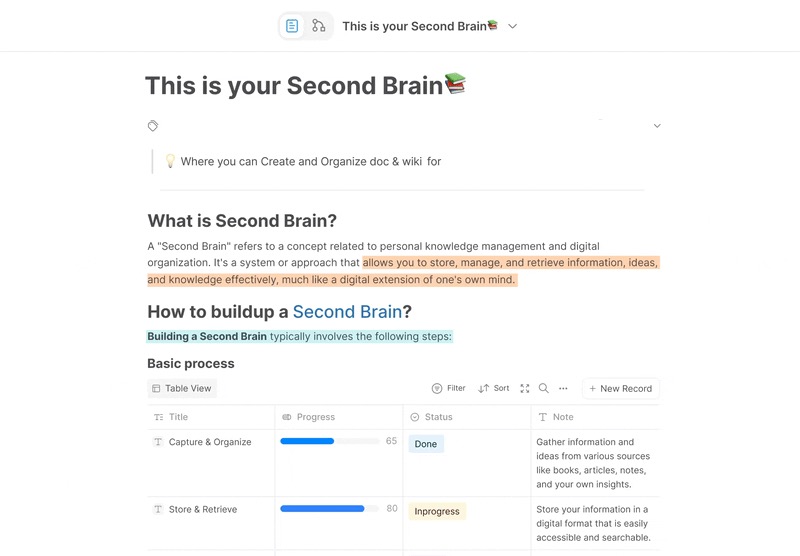
AFFiNE is a fantastic open-source, all-in-one knowledge base ideal for creating table, embracing a database consisting of Table and Kanban, as comprehensive assistance to upgrade your workflow. In addition to table and kanban views for storing data values, it also provides offline-first support, complete markdown support, and other amazing features. With our elevated Notion Import feature, you can now bring it to your table chart template with just one click.
Key features:
-
Data Management in Table View: It's essential to organize your tasks by day and schedule them on a single table. You can experience the strength of a powerful database that supports drag-and-drop, keyword search, filtered grouping, and column hiding. To enhance your table of contents, you can add properties, set timelines, divide tasks, create table title and monitor your daily progress, allowing for personalized categorization.
-
Project Planning Whiteboard Layout Idea: AFFiNE's project planning template gives you a comprehensive view of your project similar to a table view, having six sections, namely, 'Participants', 'Goals', 'Users', 'User Benefits', 'Activities', and 'Deliverables.' Laying out each section carefully on a whiteboard, helps users map out every component of the event. This visual tool helps users track responsibilities, align team efforts with user expectations, and ensure that every deliverable is accounted for and aligns with the set goals.
- Data import and export options: If you already have data in a spreadsheet or other format, AFFiNE supports PDF, PNG, Markdown and HTML export! It supports the saving and sharing of multiple file formats, which can greatly improve your work efficiency, and you no longer have to worry about data migration!
- Advanced Collaboration Capability: When you do need to collaborate with other contributors to discuss your digital planner, AFFiNE makes getting feedback simple. Appealing collaboration capability provides visibility into assigned tasks, making tables easier to estimate, and ensures your digital planner remains well-designed. You can invite team members or friends to collaborate on the marketing pipeline together, making it perfect for business scheduling.
2. Canva
Canva is an easy-to-use, web-based graphic design tool that has gained a lot of popularity. It is a platform that allows users to create content with a strong visual representation of design. Essentially, Canva can be thought of as an online version of Photoshop, which is tailored to meet the needs of small businesses and individuals who may not have any design skills or access to a professional designer. With Canva, you can create visually appealing content such as social media graphics, presentations, posters, tables, and more.
Key features:
-
Magic writing AI.
-
Image enhancer.
-
Add frames to photos
Pros of Canva
-
Pre-made templates help you to save your precious time.
-
Team collaboration feature helps you to share designs & work together.
Cons of Canva
-
Inserting a table is not that easy
-
Output formats are limited
3. Creatly
Creately is a data-connected visual workspace where you can plan and brainstorm new projects. The software is built to help you make flowcharts quickly and easily. Creately boasts an extensive library of shapes, icons, and templates that cater to various industries' needs. Its advanced diagramming features make it suitable for both professionals and students alike.
Key features:
-
Huge library of shapes. Allow choose the shape from Icon Finder or Google.
-
Automatically pick the right connector.
-
Create complex shapes from the written text.
Pros of Creatly
-
Support real-time collaboration.
-
Offer Web and desktop apps.
Cons of Creatly
-
Limited template selection.
-
Cancelling or changing an account requires an email to the company.
4. Visme
Visme offers templates and tools for making professional slide decks, social media posts, online ads, tables, and more. That means people can work from ready-made samples and quickly turn them into their own branded content. Its strongest features are its user-friendly presentation, infographic & document creator, as well as its tool kit.
Key features:
-
Access Controls/Permissions.
-
Activity Dashboard.
-
Table-making.
Pros of Visme
Numerous templates for slideshows and marketing materials
Cons of Visme
-
Lower-priced plans are too restrictive
-
Does not support guest collaborators
5. Smartsheet
Smartsheet is a popular project management tool that describes itself as a “work execution platform. Combining the flexibility of spreadsheets with project management tools, Smartsheet empowers users to create custom workflows that align perfectly with their unique agile needs.
Key features:
-
Multiple templates that can adapt to the ever-changing demands of project scheduling
-
Present data in a clear and organized manner
-
Secure and user-driven
Pros of Smartsheet
-
Easy to pick up
-
Collaborative and adaptable
Cons of Smartsheet
-
The complexity involved in setting up more complex workflows or automation
-
Limited integration options
6. Miro
Miro embraces more than 1,000 templates, including mind maps, Kanban boards, Gantt charts, product wireframes, research boards, and flowcharts. Miro provides a table chart online platform where teams can brainstorm ideas, map workflows, and design prototypes all in one place. This versatile tool combines whiteboarding, collaboration, and project management functionalities, taking visual communication to new heights.
Key features:
-
Provide real-time collaborative drawing
-
Built-in comments, video, chat, and seamless communication
-
Unlimited team workspaces with granular permissions, privacy & sharing controls
Pros of Miro
-
Easy-to-build smart-looking flowcharts and mind maps
-
Simple to collaborate with teammates
Cons of Miro
-
Hard to import or export content from time to time
-
Difficult to navigate large accounts
7. Trello
Trello is also among the finest table-making tools for distributed teams because of its focus on project management. You can see the large picture of all your projects at once thanks to the Table view it employs. If you open the chart for a certain project, you can see where it stands. By creating a board for each undertaking, you will be able to do more than ever before.
Key features:
-
Support the Table view system for organizing tasks.
-
Customizable lists represent a stage of a project.
-
Map view that is available to track location-based tasks.
Pros of Trello
-
Agile collaboration.
-
Superb notification system.
Cons of Trello
-
Limited advanced features for complex projects.
-
Over-reliance on third-party integrations.
8. Venngage
Venngage provides a range of business-to-business templates that can be used to communicate complex information, both within and outside the organization, without the need for a designer. You can use Venngage to create and organize important visual assets for your organization, such as reports, organizational structure, onboarding guides, research documents(PDF files), and white papers.
Key features:
-
Sync collaboration support.
-
Mindmaps tracks and auto-layouts that shape mindmaps
-
Powerful mindmap examples for strategic planning
Pros of Venngage
-
Multiple design solutions are available for non-designers.
-
Offer employ of templates
Cons of Venngage
-
Many templates are the same, and difficult to edit for users' purposes.
-
Clunky and nonintuitive for graphic creation.
9. Gliffy
Gliffy is a great choice for teams in need of a reliable and integrated diagramming tool on Confluence. With its intuitive user interface, plenty of ready-to-use components, and automatic updating of diagrams, there's no need to worry about having an outdated image - you'll always have the latest version. As if that weren't enough, Gliffy has Cloud Fortified certification, over 18 million users, and a long pedigree within Atlassian's products.
Key features:
-
Links and syncs diagrams
-
Real-Time collaboration in Confluence cloud
-
Advanced security and access management features
Pros of Gliffy
-
Wide range of shapes, symbols, and templates designed for flowchart
-
Support collaboration
Cons of Gliffy
-
Occasional lags and errors when you work with a large diagram
-
Limited option to export selected areas directly as PNG or JPEG
10. Airtable
With its intuitive interface and powerful features, Airtable is a popular choice among users looking for a flexible alternative to Microsoft Access. The system uses a spreadsheet format to organize data. Related data can be linked together. It allows you to create table and custom databases, manage data with ease, and collaborate seamlessly with your team.
Key features:
-
Low-code application development platform
-
Native AI components and dynamic AI functionality
-
Relational databases that sync in real-time with other systems
Pros of Airtable
-
Offers templates for easy setup and use
-
Provides real-time collaboration and communication
Cons of Airtable
-
Limited project customization without a paid plan
-
Take time to learn and grasp advanced features
Frequently Asked Questions About Free Online Table Makers
1. What is the best free online table maker in 2026?
AFFiNE is the strongest free online table maker in 2026 for all-in-one knowledge work — it combines table view, database blocks, kanban, and whiteboard in one open-source local-first workspace. For relational data, Airtable leads; for visual design tables, Canva leads; for project-tracker grids, Smartsheet leads.
2. Can I make a free table online without signing up?
Yes — AFFiNE, Canva, and Gliffy let you build a basic table in the browser without creating an account, then prompt to save. For shareable links, persistent storage, or team collaboration, free-tier sign-up is usually required. AFFiNE also offers a fully local-first option that stores tables on your device without any cloud account.
3. What is the difference between a table maker and a spreadsheet?
A spreadsheet (Excel, Google Sheets) is optimized for calculation — formulas, pivots, and numeric analysis. A table maker is optimized for presentation and sharing — readable layouts, color, embedded media, and clean export to docs, slides, or web pages. The 10 tools in this guide sit in the presentation tradition, not the calculation tradition.
4. Are these table maker tools really free?
All 10 tools offer a permanent free tier sufficient for individual use and small tables. Free-tier limits typically apply to record count (Airtable: 1,000 records), team seats (Smartsheet: 1 user), or export formats. AFFiNE is fully free and open-source with no record or seat cap on the local-first version.
5. Which free table maker is best for team collaboration?
AFFiNE and Airtable are the strongest free table makers for team collaboration in 2026. AFFiNE offers real-time collaborative editing on tables, kanban, and whiteboards under one roof; Airtable offers structured collaboration around relational records. Miro and Trello are better for whiteboard-style or task-board collaboration where the table is one of many block types.
Refresh Your Table-Making Experience at AFFiNE
Remember: Tables don't have to be tedious and time-consuming anymore – embrace the power of modern technology with these top 10 free online table chart maker tools in 2026! With AFFiNE, you can create beautiful tables with just a few clicks. Whether you need a simple data table or a complex financial report, this tool covers you.
The intuitive interface lets you customize tables to fit specific use cases — from simple data tables to complex linked databases. AFFiNE is open-source, local-first, and free to use today: build your first table in under five minutes, then share it with your team or publish it to the web. Start with a free table template or download AFFiNE for desktop, mobile, and web.