RACI Chart Template 2026: 10 Free Versions for Excel
Updated May 2026 with a side-by-side template comparison table, RACI variant glossary (RASCI, DACI, CAIRO), and 6 FAQs covering the most common implementation mistakes.
A RACI chart — Responsible, Accountable, Consulted, Informed — is the single most useful artifact for stopping the "I thought you were doing it" problem on any cross-functional project. The framework dates back to the 1950s and is documented in the Project Management Institute's PMBOK Guide as a Responsibility Assignment Matrix, which is its formal name.
This guide rounds up 10 free editable RACI chart templates you can download today — for Excel, PowerPoint, Smartsheet, and AFFiNE — plus a five-step process for filling one in correctly, a glossary of the four roles, and the variants (RASCI, DACI, CAIRO) you'll see in PM circles. Use the comparison table below to skip to the template that fits your tool stack.
At a Glance: 10 RACI Chart Templates Compared
| # | Template | Tool / Format | Best For | Customization |
|---|---|---|---|---|
| 1 | AFFiNE Cross-Functional RACI | AFFiNE doc | Multi-department projects | Full (database, kanban, table views) |
| 2 | AFFiNE Weekly RACI | AFFiNE doc | Weekly status tracking | Full |
| 3 | Vertex42 RACI Matrix | Excel | DIY single-project use | Medium (conditional formatting + dropdowns) |
| 4 | ProjectManager Excel RACI | Excel | Reference / training | Medium |
| 5 | Smartsheet Excel RACI | Smartsheet / Excel | Project leadership tracking | Medium (color-coded groups) |
| 6 | Teamgantt Excel RACI | Excel | Quick blank starting point | Medium |
| 7 | Miro RACI Matrix | Miro board | Visual / workshop facilitation | Medium |
| 8 | Creately RACI Chart | Creately canvas | Kanban + timeline overlays | Medium |
| 9 | Venngage RACI Matrix | Venngage design | Stakeholder presentations | Medium (visual styling) |
| 10 | SlideModel PowerPoint RACI | PowerPoint | Slide-deck explanations | Low |
What is a RACI Matrix?
A RACI matrix is a tool that defines and clarifies roles and responsibilities within an organization or project. The acronym RACI stands for Responsible, Accountable, Consulted, and Informed. The "Responsible" role designates the person or team responsible for completing a specific task. The "Accountable" individual takes ultimate ownership of the task's success or failure.
Those who are "Consulted" provide input and expertise during task execution. Individuals marked as "Informed" are kept up-to-date on progress but do not play an active role. By using a RACI matrix, teams can avoid confusion surrounding duties, enhance communication channels, increase accountability levels, and ultimately improve overall project efficiency.
How to Create a RACI Chart?
Creating a RACI chart is a straightforward process that can help streamline project management and improve team clarity.
Step 1: Task Identification
- Begin by listing all tasks or activities required for project completion.
Step 2: Responsibility Assignment
- Identify individuals responsible for each task, who hold ultimate accountability for its successful completion.
Step 3: Accountability Determination
- Determine accountable parties who oversee task success without direct execution, ensuring alignment with project objectives.
Step 4: Consultation Designation
- Designate key stakeholders whose input is crucial before finalizing decisions or actions, enhancing project quality and stakeholder engagement.
Step 5: Information Specification
- Specify individuals who should be informed of project progress regularly, promoting transparency and maintaining stakeholder alignment.
Following these steps meticulously ensures the creation of a comprehensive RACI chart that fosters collaboration, accountability, and ultimately, project success.
10 Best Free RACI Chart Templates
Looking for the best free RACI chart templates to streamline your project management process? Look no further! We've curated a list of 10 top-notch options that are sure to enhance your task delegation and accountability.
1. AFFiNE Cross-Functional Team RACI Matrix
The AFFiNE cross-functional team RACI matrix template aims to streamline project management and enhance collaboration within diverse teams. Made up of a comprehensive breakdown of tasks and corresponding responsibilities, this template facilitates clear communication and accountability across various functional areas. Ideal for complex projects involving multiple departments, this matrix helps clarify responsibilities across teams.
2. AFFiNE Weekly RACI Chart Template
The AFFiNE weekly RACI matrix template is designed to help manage task delegation and accountability within projects weekly. This template provides clear task definitions and corresponding responsibilities to help coordinate tasks effectively and track progress throughout the week. Assigning roles such as Responsible, Accountable, Consulted, and Informed for each task ensures a smooth workflow and alignment toward weekly objectives.
3. Vertex42 RACI Matrix Template
The Vertex42 RACI matrix template is a free tool that is both simple and customizable. The matrix is color-coded using automated conditional formatting. You can assign R, A, C, or I values by selecting from a drop-down box or entering combined roles such as A/R. Additionally, you can edit the table of abbreviations and descriptions to customize this template for other variants of this method, such as DRASCI, RASI, RASIC, CAIRO, and so on.
4. ProjectManager RACI Matrix Template for Excel
The RACI matrix template provided by ProjectManager can be a crucial tool for ensuring the success of your project. By utilizing this document effectively, it can serve as a guiding reference that every team member can refer to as the project progresses. A well-implemented RACI matrix can keep your project on course by clearly defining who is responsible for what tasks. When each team member knows precisely what their responsibilities are, the team can avoid miscommunication, wasted time, and confusion.
5. Smartsheet Excel RACI Template
This Smartsheet RACI model template is an effective tool for managing project roles and responsibilities with precision. The template's color-coded column sections divide roles into groups such as project leadership, project team members, project sub-teams, and external resources. You can then assign tasks to individual roles, such as executive sponsor, tech lead, or subject matter expert.
6. Teamgantt RACI Matrix Template for Excel
Teamgantt offers a free, ready-made Excel RACI matrix template that you can customize for any project you manage. This blank template is fully editable, and it includes drop-downs for assigning RACI roles more easily. You can also refer to the included RACI chart example tab for guidance if you need it.
7. Miro RACI Matrix Template
The Miro RACI chart template is an essential management tool that helps teams keep track of roles and responsibilities and avoid confusion during projects. From complex, cross-functional team projects to internal, ongoing tasks, a RACI matrix enables you to clarify roles and delegate tasks, bringing your team together to execute your project.
8. Creately RACI Chart Template
You can get started with a ready-made RACI chart template for project planning and management provided by Creately. Share your RACI matrix template with stakeholders and capture instant feedback with contextual comments. By using Kanban boards, timelines, and grids, you can visually organize your project data on an infinite canvas and gain a comprehensive big-picture understanding of your projects.
9. Venngage RACI Matrix Template
The free RACI matrix chart template offered by Venngage is the perfect tool for project managers who need to organize their team's responsibilities. By using this template, you can easily assign tasks and keep track of their progress. Moreover, it's an ideal design to promote and share with others! You can customize it as much as you want - add colors, change sizes, and select the best photos or icons from our free stock libraries to create your perfect design in Venngage.
10. SlideModel RACI Matrix PowerPoint Template
The RACI matrix PowerPoint template available on SlideModel is designed to showcase table layouts for presenting the concept and its application. The template has a slide that displays four rows of RACI with an innovative layout of bold letters and clipart icons. This RACI chart template is useful for training and educational presentations where you can explain the definition of the RACI matrix and provide brief information about the methods. With these diverse options at your disposal, you'll be equipped to tackle any project efficiently while keeping all team members accountable and engaged in the process.
Improve Task Distribution with RACI Chart Templates
Whether you are new to using RACI charts or looking to streamline your current processes, these 10 best free templates offer a wide range of options to suit your specific needs. From simple matrix layouts to more detailed examples, with AFFiNE's templates, there is a template suitable for every project and team dynamic.
Key features:
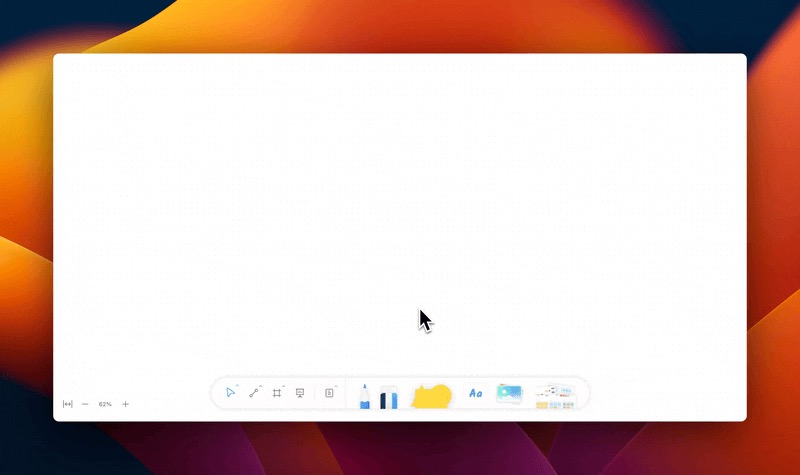
- Template Gallery in AFFiNE: There is a curated collection of powerful whiteboard templates in AFFiNE. From the robust Gantt charts to the insightful Kanban board and the comprehensive project management charts, an array of additional templates awaits your exploration, promising to expand the horizons of your marketing and sales pipeline crafting and execution. These templates serve as your launchpad, enabling you to skip the groundwork and jump straight into action. Crafted for seamless collaboration, AFFiNE's templates provide structured canvases for various tasks, saving you valuable time and enhancing efficiency in project management, content creation, and planning.
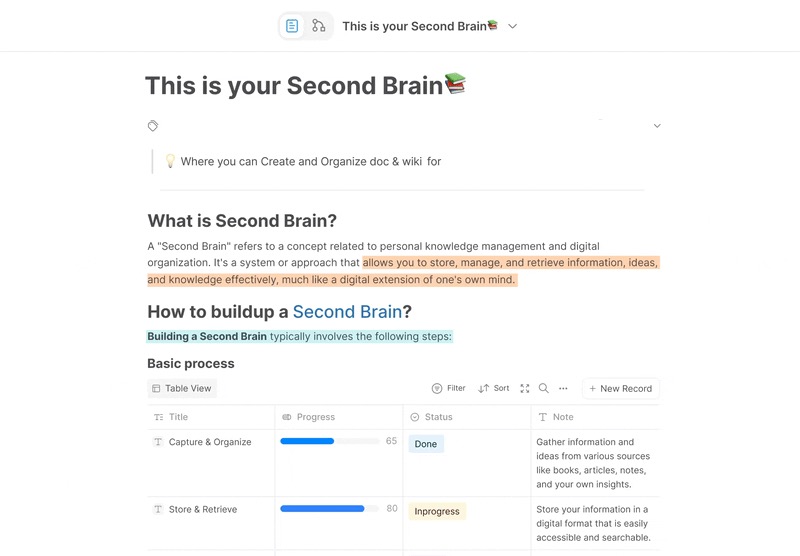
- Tailored Precision with AFFiNE's Database: AFFiNE's database seamlessly integrates Kanban and Table views for dynamic charter creation. By smoothly transforming your blocks into a Kanban view, effortlessly classify based on charter properties such as date, progress, and link. This allows for intuitive drag-and-drop functionality, ensuring precise organization and alignment of your project execution. Switching to the Table view offers a comprehensive project overview, enhancing the efficiency of your narrative development. With intuitive controls, track deadlines and manage unscheduled tasks seamlessly.
- Collaborative Editing: Foster collaboration among team members by using AFFiNE's collaborative editing tools, and foster collaboration among team members. Multiple team members can work on email content simultaneously, ensuring a seamless and efficient content creation process. Share files, exchange ideas, and provide feedback in real-time through AFFiNE. With AFFiNE, everyone can contribute to the same set of notes in real-time.
Take advantage of the power of RACI charts today by using AFFiNE and start optimizing task distribution within your projects. Watch as productivity increases, collaboration improves, and projects are completed with greater success.
Empower your team with clear roles and responsibilities using RACI chart templates - the key to effective task management. AFFiNE regularly releases new stable versions, with ongoing efforts to develop a more comprehensive and dependable iteration. Join us on our voyage through our social media channels and be part of the experience. Come and join us on our journey over on our media platforms. 🚀
Frequently Asked Questions
What does RACI stand for?
RACI stands for Responsible, Accountable, Consulted, and Informed — the four roles assigned to each task in a Responsibility Assignment Matrix. The Project Management Institute documents this as one of the standard tools for clarifying task ownership on a cross-functional project.
Can a person be both Responsible and Accountable?
Yes, and on small teams it's common — one person both does the work (Responsible) and owns the outcome (Accountable). The rule is that there must be exactly one Accountable party per task. Splitting Accountability across two people is the most common RACI failure: when everyone owns it, nobody does.
How many people can be Accountable for a single task?
Exactly one. This is the load-bearing rule of RACI. You can have multiple Responsible parties, many Consulted, and many Informed — but Accountable is always a single named person. If you find yourself wanting to name two, the task probably needs to be split into two tasks.
What's the difference between RACI, RASCI, and DACI?
RACI is the four-role original (Responsible, Accountable, Consulted, Informed). RASCI adds an S for Supportive — people who help the Responsible party but don't own delivery. DACI is a decision-focused variant (Driver, Approver, Contributors, Informed) used for meeting decisions rather than ongoing project tasks. CAIRO adds an O for Out-of-the-loop, useful in regulated industries.
When should I use a RACI chart instead of a Gantt chart?
Use both — they answer different questions. A Gantt chart shows when work happens (timeline and dependencies). A RACI chart shows who does each piece (ownership and approval flow). On any project with more than three people, both artifacts pay for themselves within the first week.
How is a RACI chart different from a swim lane diagram?
A RACI chart is a static role-assignment matrix (rows = tasks, columns = people). A swim lane diagram is a process flowchart with each lane representing an actor. RACI tells you who owns what; swim lanes tell you how work flows between people. Many teams keep both — RACI in a doc, swim lanes in a whiteboard tool.